Back to the Main page
AI-Powered Interactive Guides
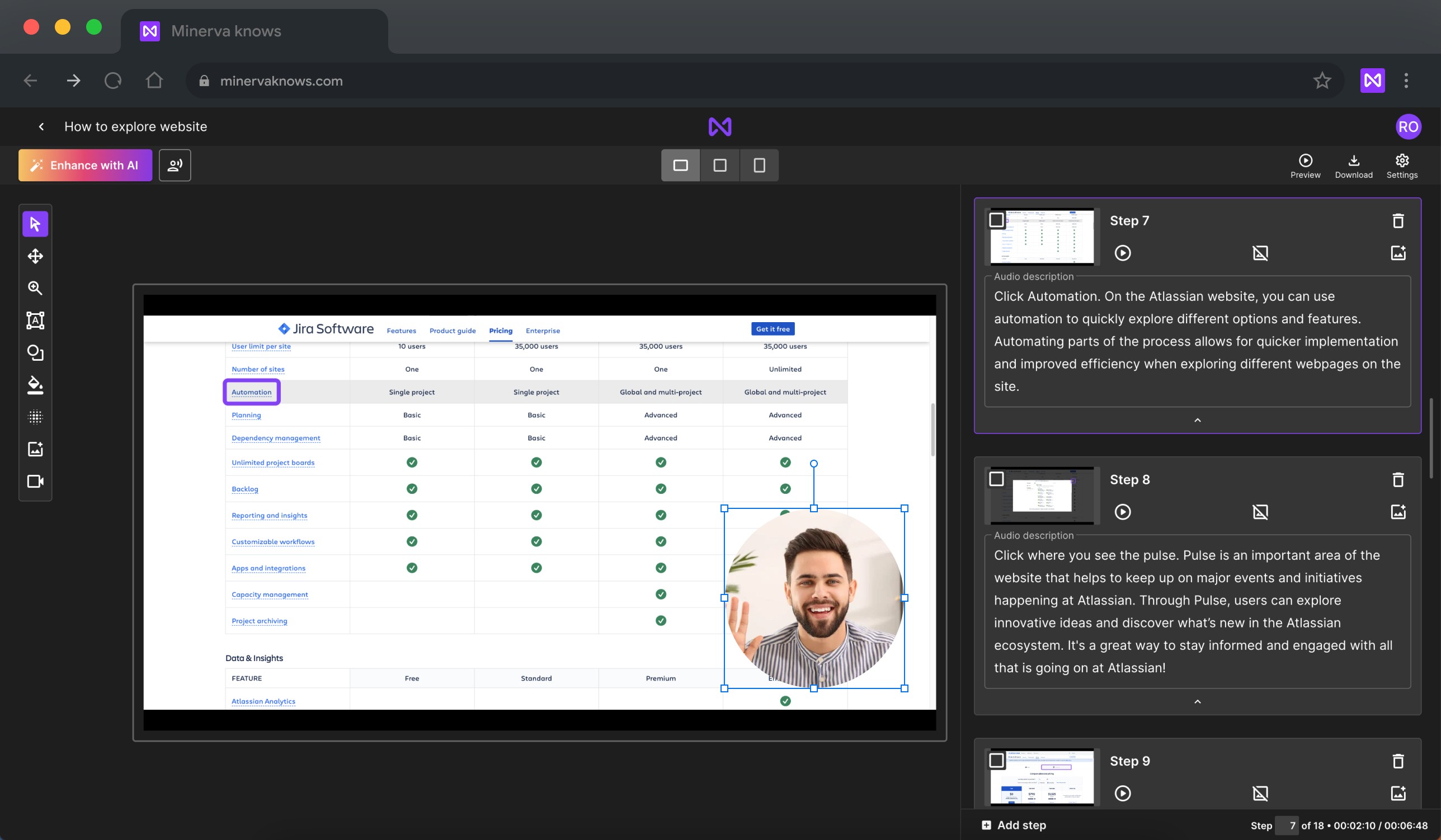
Overview
Minerva is intended to help organizations create comprehensive knowledge bases and support documentation for their products or services. It includes features like how-to videos, FAQs, and interactive instructions, making it a good option for onboarding, SaaS product adoption, and internal team communication.
Timeframe: 6 months
Team: Lead UX Designer/Business analyst (Me), UX Designer, 2 Front-End Developers, 1 Back-End Developer, QA, PM
Platform: Web App
Industry: AI Gen, SaaS, B2B, B2C
Intro
When we were approached to improve the UX of an AI-powered interactive guides platform, the client had one major concern: the first version of the product was designed without UX expertise, leading to significant usability challenges.
As the Lead UX Designer, my mission was to transform the user experience of the Studio functionality, making it more intuitive, accessible, and efficient.
Since we didn't have a Business Analyst in our team, I offered to take on these responsibilities.
My Role & Collaboration
As the Lead UX Designer/Business Analyst, I played a pivotal role in:
Facilitating stakeholder alignment by organizing cross-functional workshops with developers, PMs, and QA teams
Advocating for UX decisions based on user research and usability testing data
Balancing user needs with technical feasibility by working closely with engineers to ensure design feasibility
Managing the design system to ensure consistency across the platform and streamline future iterations
Managing the design team and stakeholders to ensure high-quality deliverables are completed on time
One of the biggest challenges was aligning the redesign with business goals while ensuring development constraints were met. By maintaining open communication with stakeholders, we successfully prioritized critical UX improvements without derailing project timelines.
Challenge
The existing product allowed users to create interactive and video guides for web-based products. However, research showed that users struggled with:
A complex and unintuitive UI that made core functionalities difficult to navigate.
Low discoverability of AI-powered features such as "Enhance with AI" and "VoiceOver."
Confusing recording process in the Chrome extension—users were unsure when recording started or stopped.
Lack of usability resulted in frustration, low adoption rates, and inefficiencies for businesses using the platform.
Additionally, we faced strict timeline and budget constraints, which influenced our design decisions and technical implementation. We had to find simple, effective solutions that balanced business goals, user needs, and development feasibility.
Research Insights
User interviews
To diagnose the problems, I conducted 5 user interviews and a UX audit of the current platform. Key insights emerged:
3/5
users found the Studio interface overly complicated, with unclear icons and redundant features
5/5
users had difficulty understanding the recording process in the Chrome extension
4/5
users struggled to find key AI-powered features
UX Audit
The UX audit revealed some important issues that users also mentioned during interviews.
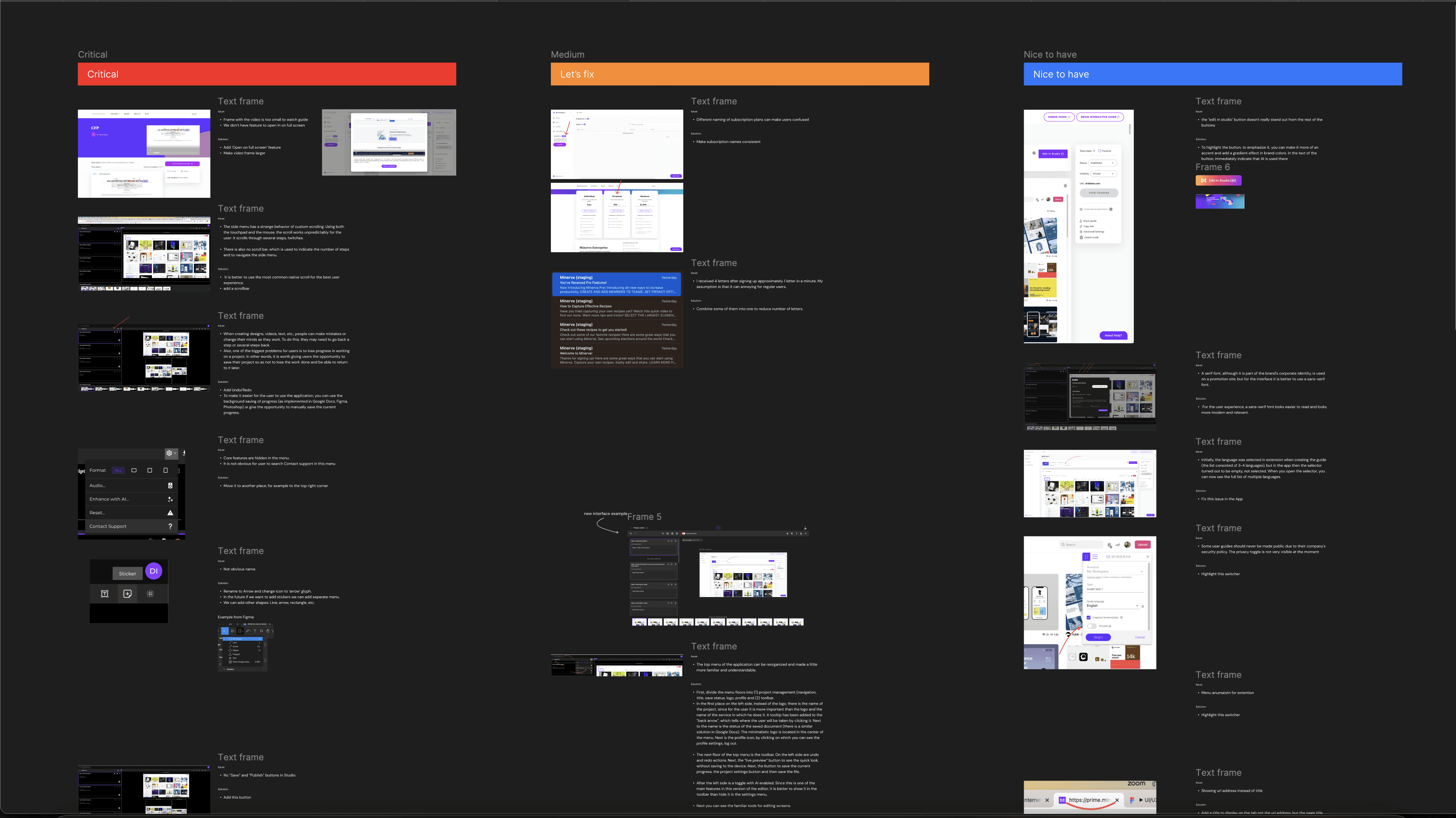
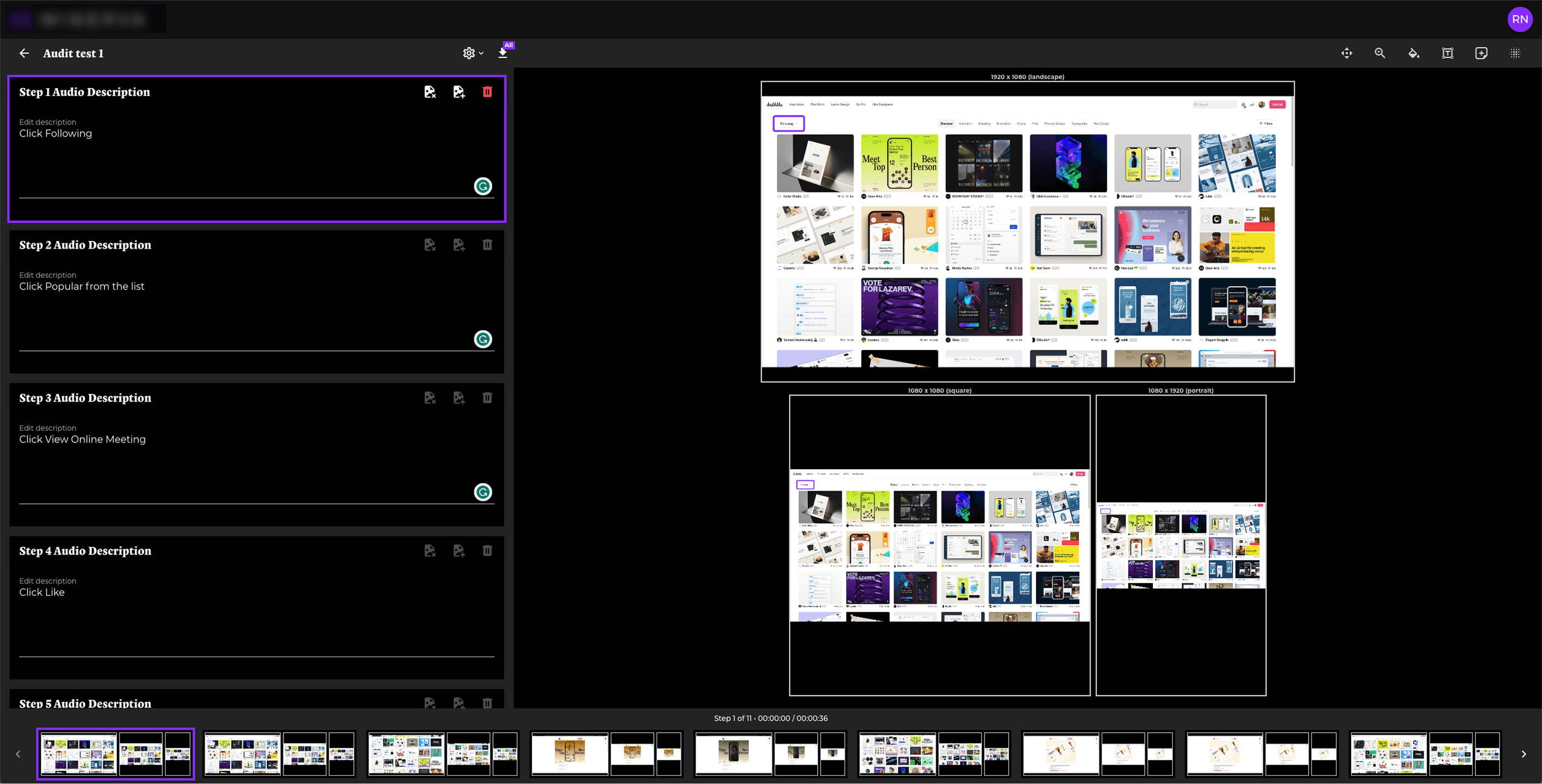
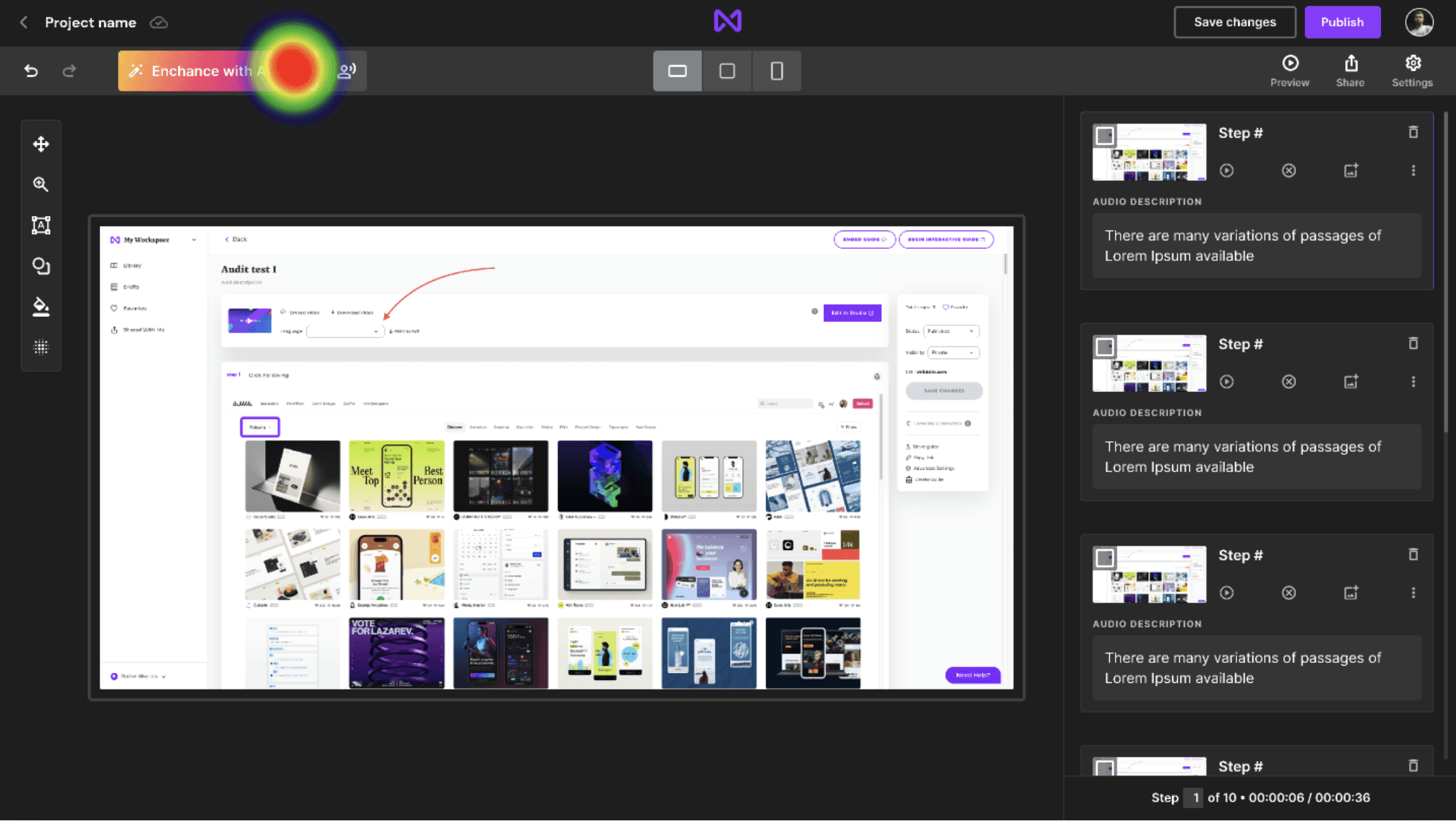
Here is the screenshot of the first version of the Studio interface:
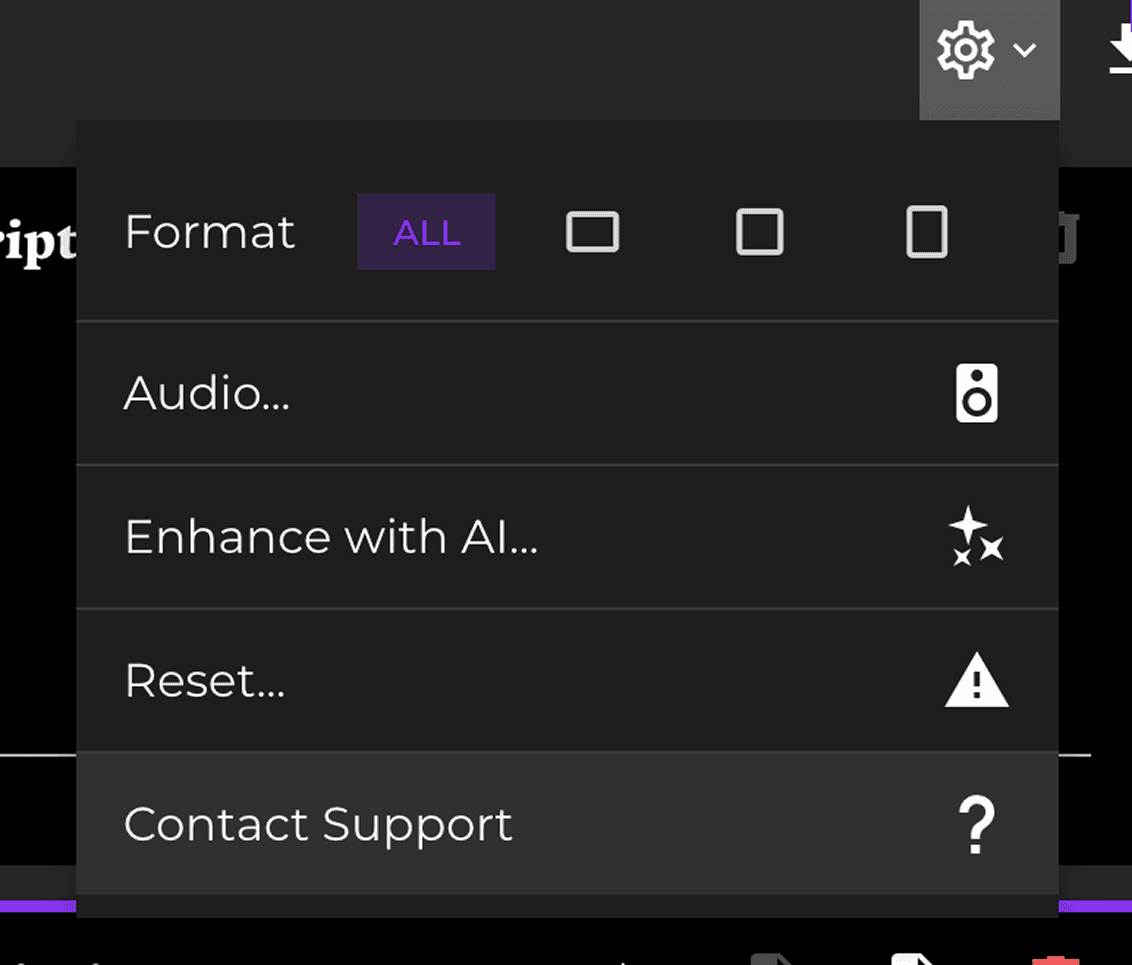
‼️ The Enhance with AI and AI-generated VoiceOver are core features, but they were hidden under the context menu.
🔎 Here are some important points from the UX audit:
The Chrome extension didn’t clearly indicate its current state, making it hard to figure out how to start or stop the interactive guide recording
There was no option to Undo or Redo actions
Key features were buried in the context menu
The interface felt overly complicated and had a strange layout for a guide or presentation tool
Users found the separated steps and timeline confusing
It was tricky to manage three screens at once, which added to the confusion
There was no way to save changes or publish the guide
Sharing functionality was missing
Mapping the Experience
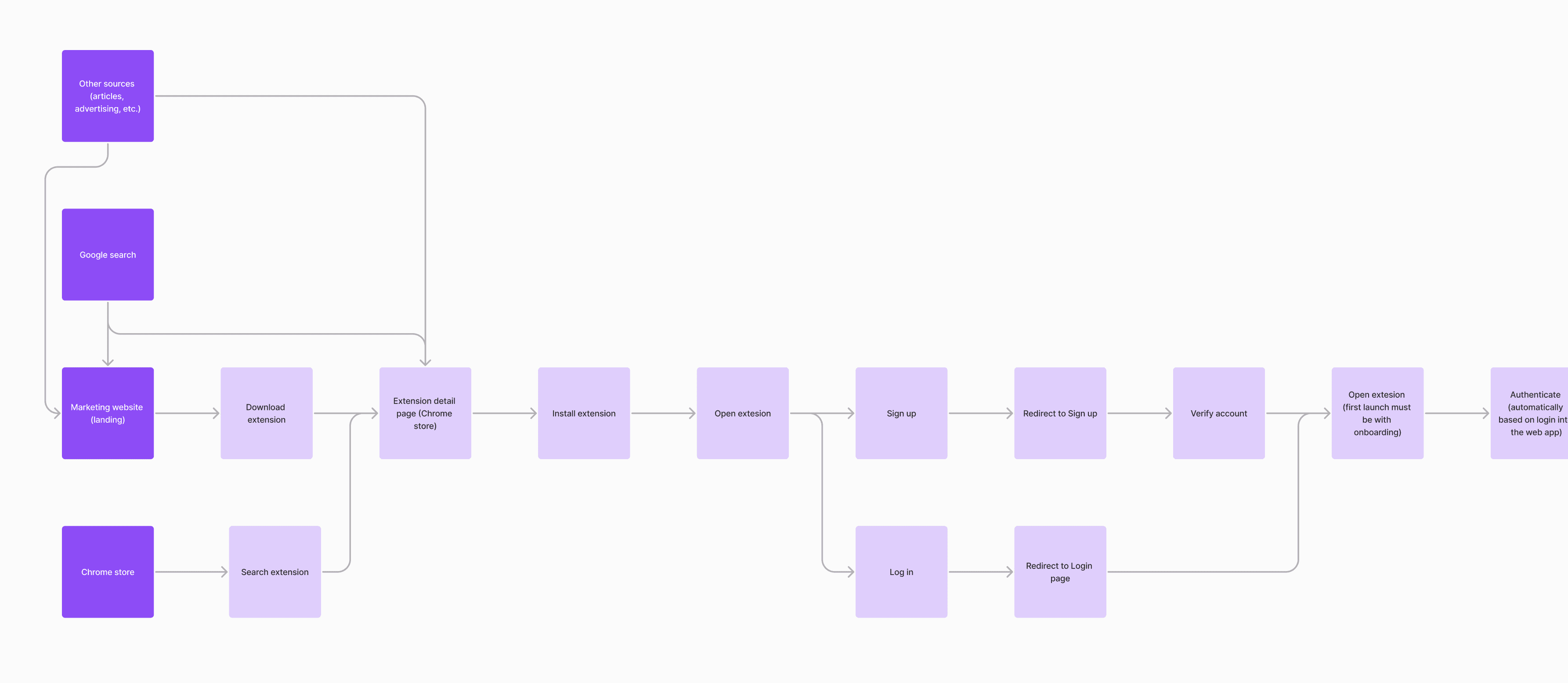
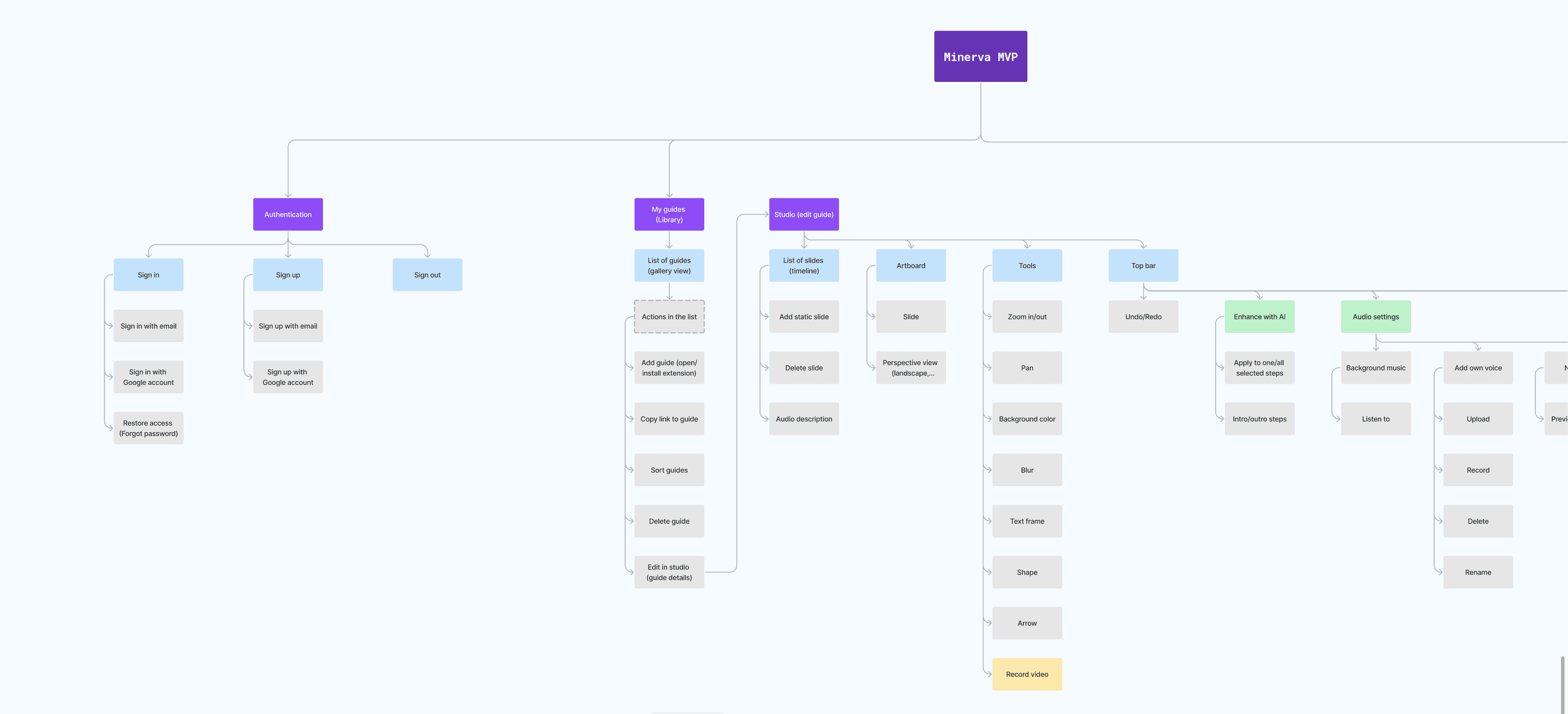
I visualized existing user flows and information architecture to reveal bottlenecks.
🔎 This exercise revealed:
Unnecessary complexity in organization and feature management
Duplicate features that confused users and needed to be removed
Problem Statement
Users creating interactive guides with Minerva struggle with an unintuitive UI, unclear recording states, and hidden core features. This complexity leads to frustration, low adoption rates, and frequent support requests. In particular, new users find it difficult to locate AI-powered tools, reducing engagement with key product differentiators. Without a streamlined experience, businesses face inefficiencies in knowledge sharing, limiting Minerva’s growth and customer retention.
Redesign process
Ideation & Prototyping
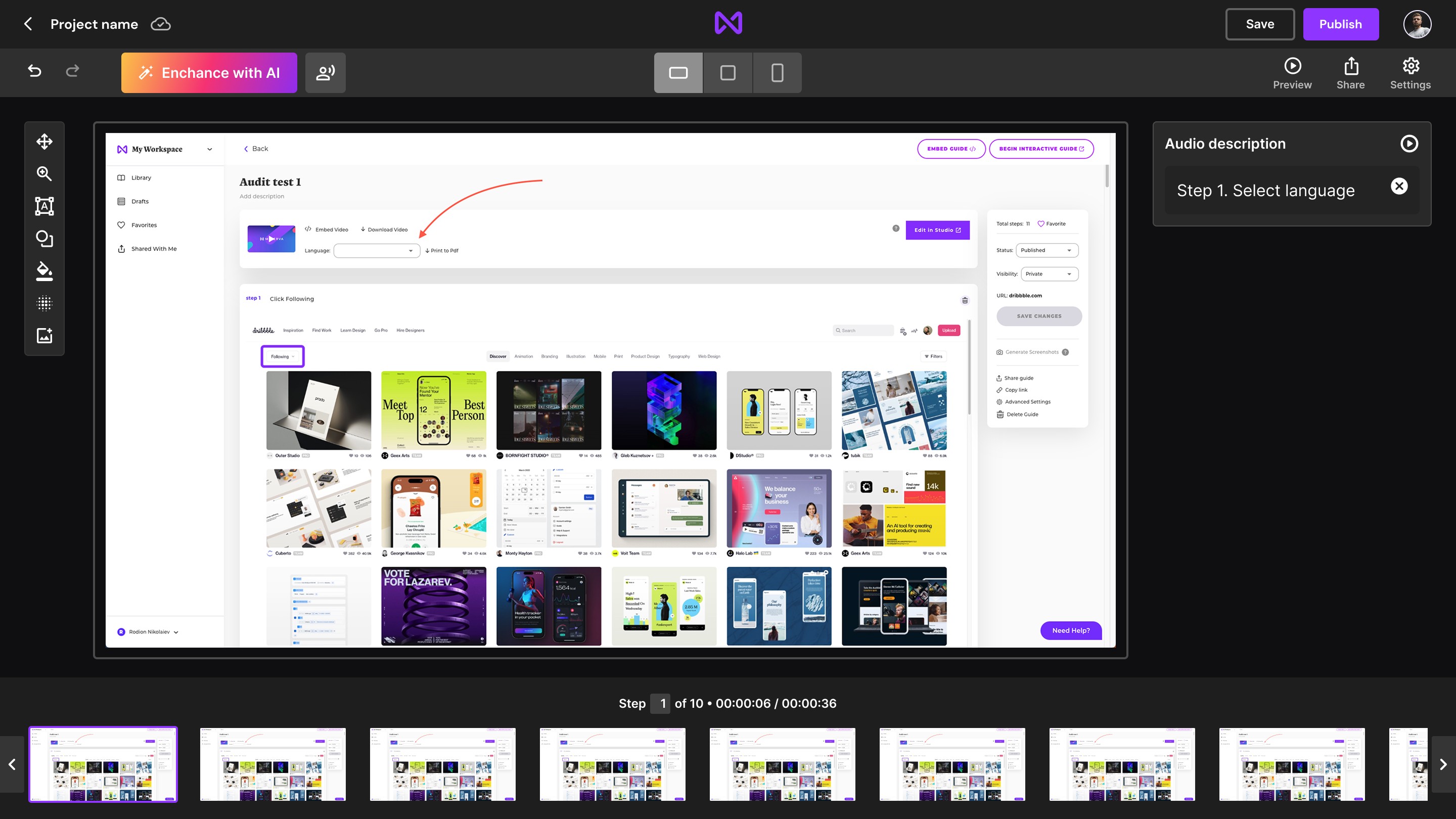
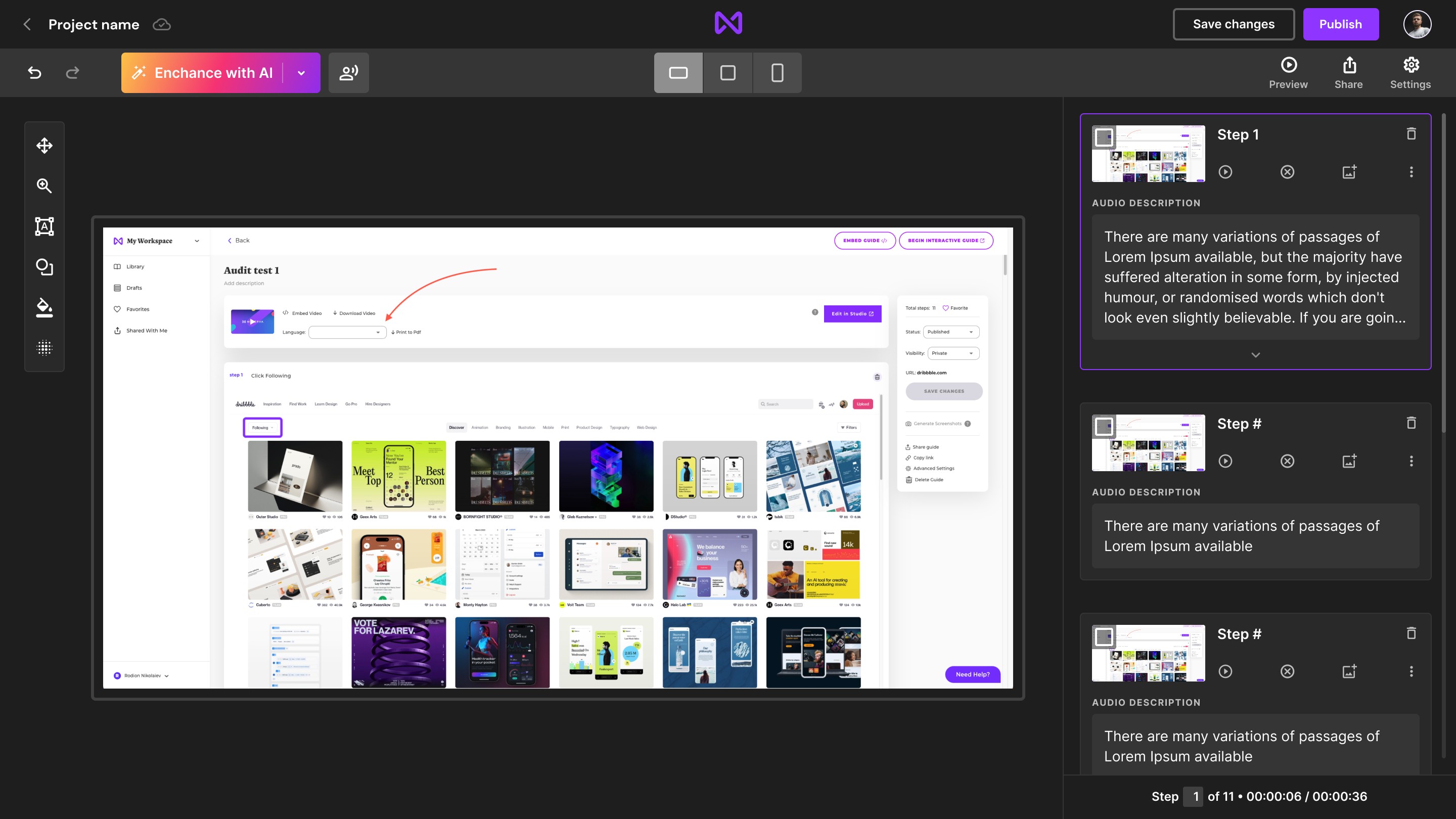
We focused on simplifying the interface while making AI features more discoverable and usable. Some key design decisions included:
Borrowing familiar structures from presentation/video editors to enhance usability
Introducing a recording status badge in the Chrome extension for clear visual feedback
Creating a scalable design system to maintain consistency across features
Prototype v1
Prototype v2
Testing & Iteration
Despite time and budget constraints, I proposed conducting an unmoderated usability study to validate our redesign decisions. We tested two prototypes separately and followed up each study with a survey to gather additional insights. This ensured we had user-backed data to inform our next steps.
To validate my ideas, I conducted A/B testing using Maze:
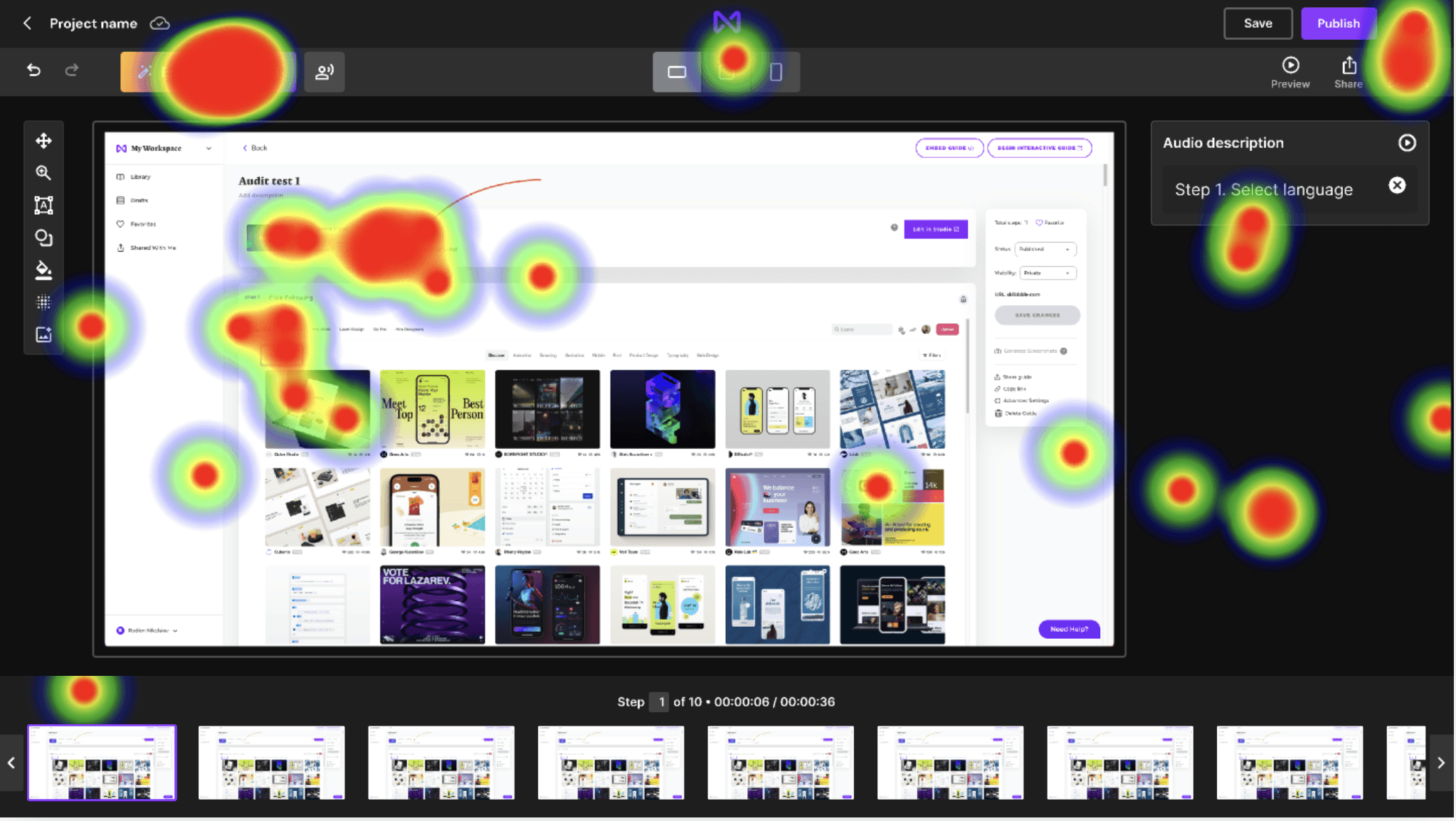
Key insights:
70%
of users preferred Version A, which had a vertical navigation structure
100%
of users didn't have issues with usage of core features such as the VoiceOver and the Enhance with AI
49%
of users struggled with Version B, which mimicked timeline-based video editors.
94%
of users found redesigned icons more intuitive.
🚀 These insights guided our final design, so we took what works from both versions and crafted the final design.
Impact
Due to a lack of initial usability metrics such as task completion rate or time on task, we were unable to make direct before-and-after comparisons. However, we tracked qualitative feedback and post-launch user satisfaction to gauge improvements:
Users reported significantly improved ease of use in post-launch survey.
Discoverability of AI-powered features increased, as indicated by user interactions and reduced guide-related support inquiries by 44%.
User engagement, measured by the number of guides created per session, increased by 32%.
Although we lacked precise UX metrics at the beginning, qualitative and behavioral indicators showed a marked improvement in user experience.
Lessons Learned
Balancing the roles of Lead UX Designer and Business Analyst was challenging, but it proved to be a valuable learning experience.
Stakeholder alignment is critical. Early collaboration with developers and PMs helped prevent late-stage design changes.
User research drives informed decision-making. Rather than relying on assumptions, we validated our approach with real user feedback.
A/B testing eliminates bias. Data-driven decisions ensured we built the most effective solution.
While A/B testing was beneficial, I would refine task decomposition to collect more precise data and actionable insights.
A design system enhances scalability. Reusable components streamlined future iterations and improved efficiency.
Measuring UX impact requires early planning. Had we integrated a usability study from the start, we could have effectively measured task completion rates, time on task, and other key usability metrics.
Strict timelines and budgets shape UX decisions. We had to balance user needs, business objectives, and technical constraints—prioritizing simple, high-impact solutions over complex optimizations.
To enhance research efficiency, I would propose integrating Clarity or HotJar as early as possible to gather behavioral insights and save time on user research.